
Track Attack V4 is the biggest update we’ve shipped! It’s packed with new features for recording drives, comparing laps, and reviewing your video and telemetry.
We added every feature we'd been asked for, plus everything we wanted ourselves. Here's a rundown of the new features and how they work!
CarPlay for the road and track
CarPlay was one of the most requested Track Attack features, and it is now available for both road and track.
On the road, you can follow your Track Attack route and map through CarPlay while the iPhone handles recording. On track, CarPlay puts live lap time and delta where they're easier to see. You can now position the phone at different locations (rear roll cage/seat mount video angle being a popular one) while seeing your lap and delta times on your CarPlay unit! Enable auto start/stop in the Track Attack app settings, and now you have a completely hands-free lap timing system with the phone mounted anywhere!
Import and sync external video
You can now import and sync external video from GoPro, DJI, Insta360, Meta (ZuckAI) smart glasses, and other cameras. Import a video from Photos into Track Attack, sync it to the session, and use it with the video and telemetry you already recorded.
This was a popular feature request for those that prefer recording on an action camera, want a second angle, or captured a drive on smart glasses. Record with your external camera while Track Attack records with the phone’s front and rear cameras, then combine all three angles in one export!
As a bonus, Track Attack can also now export a session with two videos: one video from the phone camera, and one imported from an external camera. You can of course export each video individually, or export both videos stacked vertically in a social media-friendly portrait layout! Once they’re synced, you can export either video or both together with one tap. You can choose which video gets the data overlays and which video provides the audio source. No need for a content editor or video editing software!
Compare laps with lap battles and ghost laps
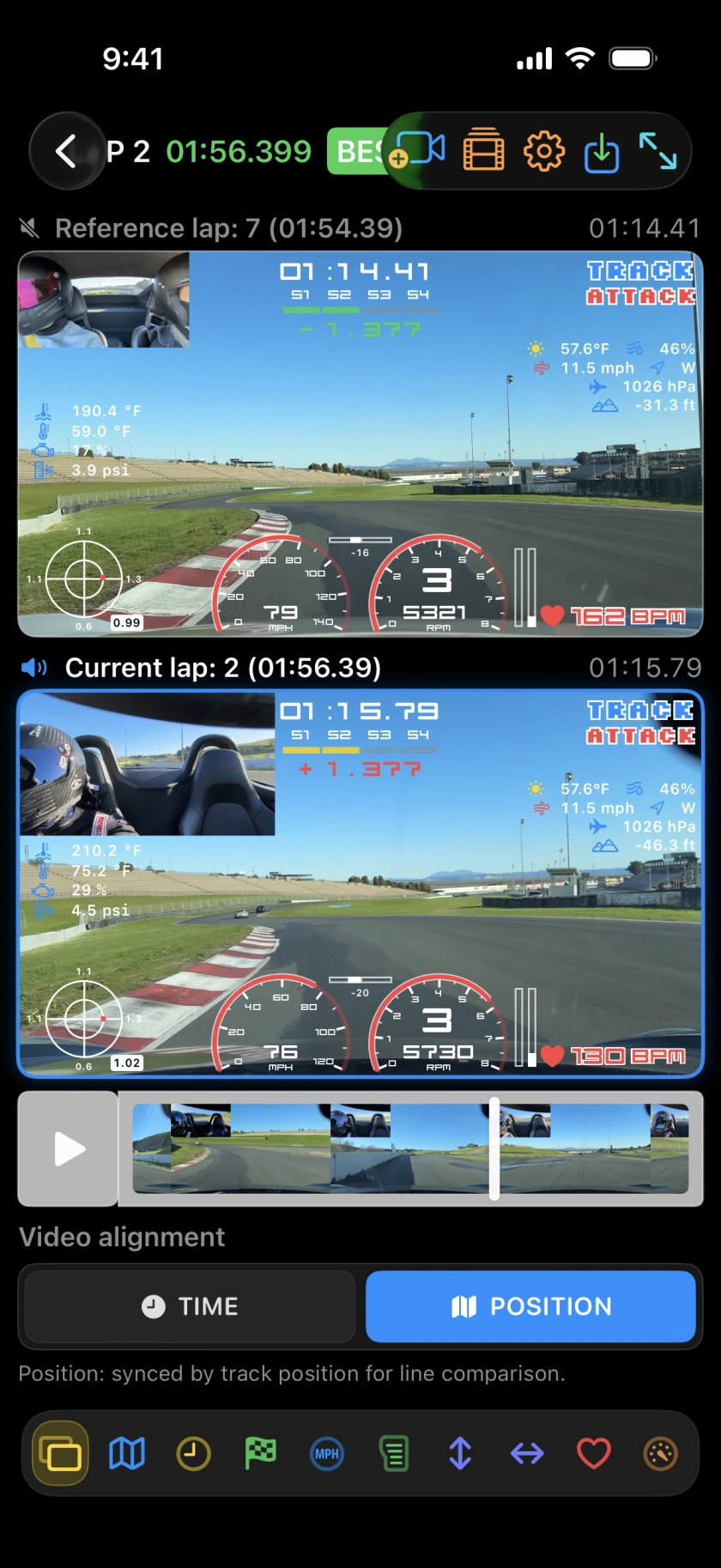
A lap time tells you which lap was faster, but it doesn't tell you why. Track Attack V4 adds two new ways to see the difference.
- Ghost laps compare against your own reference lap, such as your session best or all-time best, with synchronized video, telemetry, and 2D/3D maps.
- Lap battles compare your lap against a session shared by another driver, with dual video, telemetry, and 2D/3D maps.
Both Ghost laps and Lap battles are available in playback in the app and can be exported. Use your best lap as the reference, compare two sessions from the same track, or compare against a session a friend shared with you. You can see where one car gains under braking, through a corner, or on exit instead of trying to line up two separate videos by hand.
Share sessions with friends: video and telemetry included
Most apps make it difficult to share a complete session with telemetry and video. Track Attack V4 lets you send a session with video to another Track Attack user using AirDrop (or use your favorite file sharing service to upload and share the session). Once they open a session, it's automatically imported into their Track Attack app with video, timing, and telemetry intact.
That means a coach can review your actual session, friends can compare laps with video and data during or after a track day, and drivers can play back and export a lap battle video!
2D and 3D maps with satellite view
Switch between 2D and 3D maps, and choose standard map or satellite view. Use 2D for a clear top-down view of your driving line, or explore rich 3D maps with satellite view to see the driving path and surrounding terrain (aka the drone camera).
For a hillclimb like Pikes Peak, the 3D satellite view makes the climb and elevation changes easier to see. The map stays synchronized with your video and telemetry during playback and you can even export videos with 2D or 3D maps!
Review your racing line colored by sensor data
Track Attack V4 adds a brake meter for vehicles connected through a supported OBD adapter. It's especially useful for seeing how quickly you reach threshold braking, where you start releasing the brake, and how you trail brake into a corner.
The GPS-generated driving line can also be colored by speed, braking/acceleration, cornering, heart rate, or elevation. This gives a useful visual overview of driving performance along the track layout.
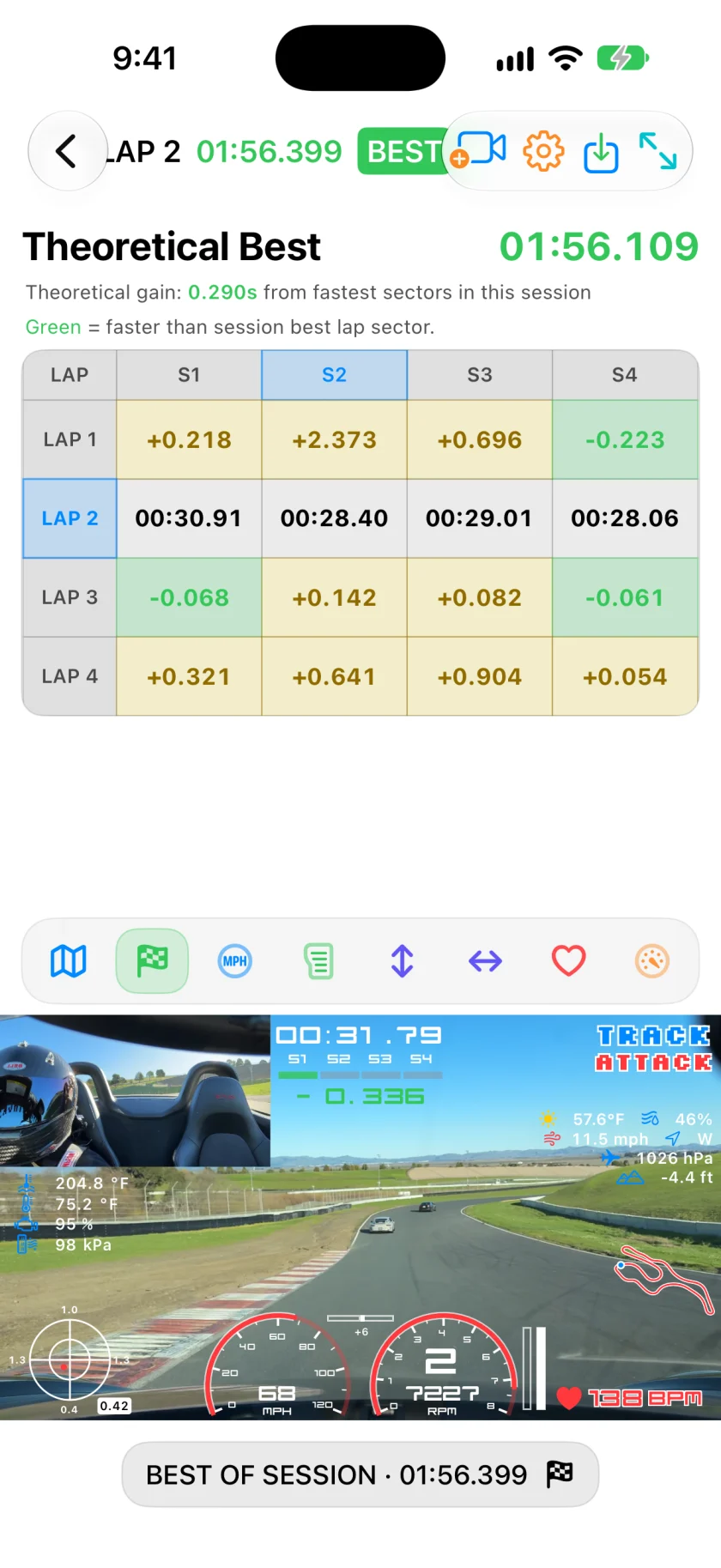
Track Attack V4 also introduces sector times with a grid view for analysis and green, yellow, and purple sector indicators in the HUD during playback and export. Instead of judging the entire lap as one number, you can get an overview of your performance over sections of the track.
Moving telemetry plots for single laps and lap comparisons
The new moving telemetry plots stay synchronized with lap playback and can be zoomed for a closer look. Depending on the sensors and devices connected during the session, you can compare:
- Speed
- Throttle and braking (requires OBD)
- RPM and shift points (requires OBD)
- Acceleration, braking, and cornering G-forces
- Delta time (time gained/lost)
- Altitude/elevation
- Heart rate
The plots and video stay synchronized, even when you scrub through the recording, so you can see what happened on track at each point in the data.
Create multiple drivers and vehicles
Track Attack now supports multiple driver and vehicle profiles. This matters if you share a car, drive more than one car, coach other drivers, or use the same device across a team. Each vehicle can also have its own gear ratios and tire information so that gear position is correctly calculated.
New and existing sessions can be linked to the appropriate driver and vehicle, and driver stats can be viewed by year, track, and session. Customize your profiles and review your road and track history, with personal bests linked to the right driver and car.
Faster video exports and more reliable recording
Video export is up to 40% faster, and you can now trim your export to just the segment you want. If you only want to share a short section of driving video, you no longer need to export the entire session first. Track videos still let you export individual laps or the entire session.
Session loading and data processing are also faster. Sensor failure handling is more robust, audio recording works better with music and navigation, and the recording pipeline is more reliable when something does not behave exactly as expected.
Lots more updates and tweaks!
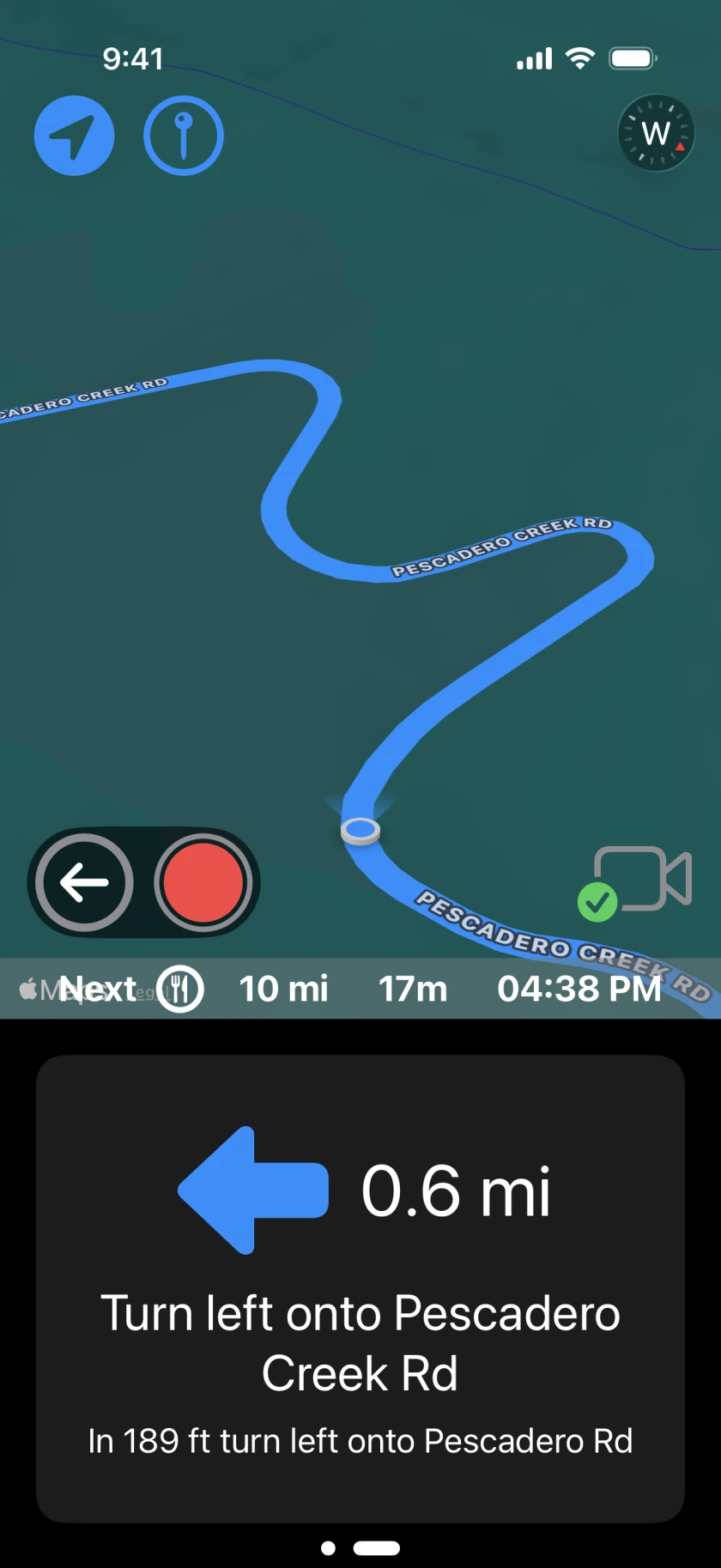
There are a lot of smaller improvements throughout Track Attack V4:
- Waypoints can now be designated as stops (gas, food & drink, rest stop, parking) and new icons make road routes and stops easier to read.
- Confirmation prompts help prevent accidental deletion of sessions, routes, or custom tracks.
- Playback, screen layouts, and the overall UI are clearer and easier to use.
- Lots of minor bugs and stability issues have been fixed across the app.
For a quick tutorial on creating routes, see Creating Routes with Track Attack.
Track Attack V4 adds lots of features, but the idea is the same: record video and data with minimal setup, drive your favorite routes, and review your laps. Then export awesome videos with telemetry, 2D/3D maps, and dual-camera views with one tap!
Track Attack V4 is available now on the App Store. If you haven't yet, give it a try! I’d love to hear what you think.
See you on the road (and at the track),
Ashod
Try Track Attack V4 on your next drive or track day